
By SUSAN JONES
“The pace of technological change with AI is faster than ever.”
MORE INFORMATION
-
An online version of “Navigating Pitt’s AI Resources for Research and Learning” will be held from 7 to 8 p.m. Feb. 23. Register here.
-
“Creating a Personal Research & Learning Assistant: Writing Effective Prompts” will teach strategies to write effective prompts that will increase the likelihood of generating useful responses. 7-8 p.m. Feb. 25, online. Register here.
Find more information about acceptable use of Gen AI tools on the Pitt Digital website.
Luke Ferdinand, technology support services manager for the University Library System, opened his January presentation on “Navigating Pitt’s AI Resources for Research and Learning” with this indisputable statement.
“The slides that we’re showing you today have been revised multiple times since I first showed them to our colleagues here at the libraries over the summer,” he said.
Ferdinand started with some truths about AI:
-
AI education is everywhere but helpful AI education is harder to find.
-
Privacy and security of data are a huge challenge with AI, which vacuums up information from everywhere. “If you’re a programmer, if you’re a writer here at the University, or even if you’re using these things personally, what’s yours and what are you giving over to these companies when you use their systems?”
-
AI is a really valuable tool, but it’s got to be validated; the information isn’t always correct.
Many AI tools are available at Pitt right now, he said. For instance, Google Gemini is available to faculty, staff and students and includes “a lot of the security measures that allow people to use it safely and secure their data safely so that Google isn’t consuming it into their massive AI engine that’s powering the commercial version of Gemini,” Ferdinand said.
Most generative AI tools are really answer generators, he said. “What they’ve done is they’ve fed as much information into a giant database as they possibly could, sometimes ethically, sometimes not.”
When you ask a question, the system will search its database for “how one word sits next to another word and how likely that word is to be called up based on the question you asked. … If it’s well-cited information, if it’s all over the internet, it will very likely give you a correct answer, but if it’s something that it doesn’t know how to answer, if the statistics don’t add up …, it could ‘hallucinate’ the response, which is basically just making up information, because it’s tasked with giving you an answer, and that’s all it’s trying to do.”
The other traditional approaches to AI in academia are things like machine learning and neural networks, which can be used to train data sets, to analyze information, and quickly reduce labor costs.
He said the library is using machine learning to analyze August Wilson’s notebooks and decipher his handwriting, which is very difficult to read at times. People will look at the notebooks and translate some of the words, then the machines can go out and find what matches, “and take transcribing those notebooks from what would have taken literally tens of human years into something hopefully much less than that.”
Available at Pitt
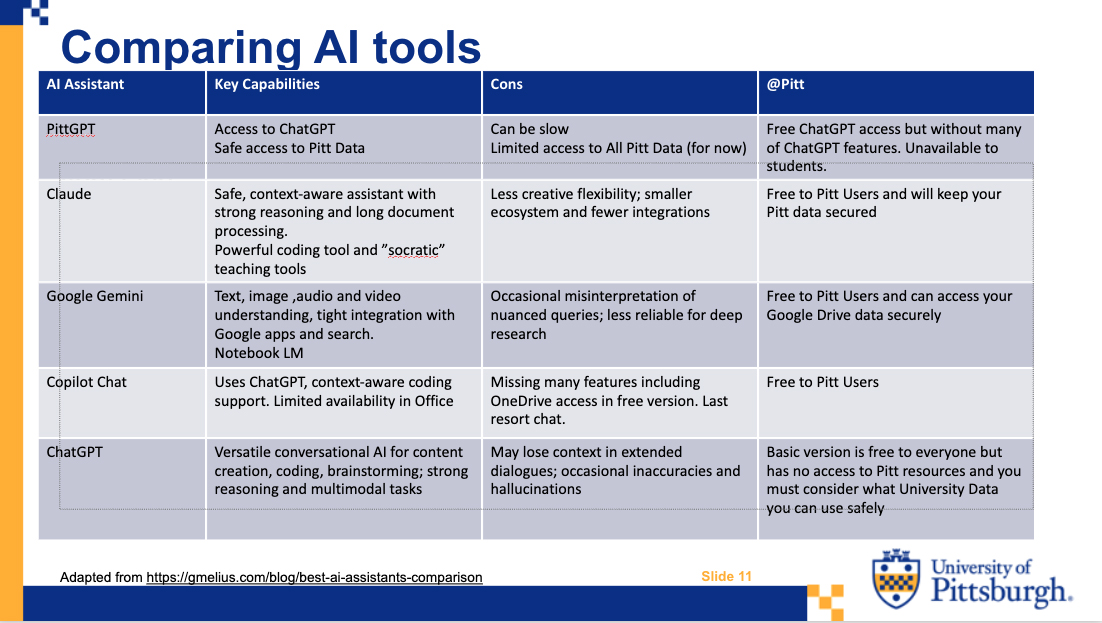
Ferdinand detailed all the different AI tools available at Pitt, focusing mostly on those that are free. All of these are available to faculty, staff and students, except PittGPT, which only faculty and staff currently can access. The best way to get into each of these is to go to their websites and sign in with your Pitt credentials.
Google Gemini: “What Google Gemini offers is that if you have a lot of information in your pitt.edu account’s Google drive, it can learn about you, and it can learn about all the data that you’ve got in that drive, and it can use that to provide more accurate, relevant, local information to you when you’re working on University information.” Pitt Digital recommends signing into Gemini with your pitt.edu account to make it more secure.
Anthropic Claude for Education: This was created as a more ethical approach to AI. “One thing that Anthropic has worked really hard on is what are called AI agents. And so it can work through strategic decisions, brainstorm solutions, debate approaches, ask for coaching and pressure-test your assumptions against what you might not see.” It’s also very popular for coding. And it can create interactive reports with reliable citations.
NotebookLM: This is another Google tool. It works exclusively with documents, links and other sources you upload. It will organize web sources, documents, PDFs, all in one place, and then you can ask it to create learning tools for you. It can create flashcards, reports, summarizations and podcasts. One drawback is that the notebooks don’t always connect to each other.
Microsoft Copilot Chat: Available through your Pitt Microsoft Office 365 account, Ferdinand said it helps users quickly find information, summarize content, automate repetitive tasks, “and this frees up time for teaching, research and learning.” No data that you submit to Copilot Chat is shared outside of the Pitt computing environment. He said if you’re a Google user, it might not be very helpful, and it can be slow at times.
PittGPT: Only available to faculty and staff, it’s “the purest approach of having University information talk directly to ChatGPT without putting any University data or personal information at risk.”
Other free tools:
Zoom AI companion: Included with Pitts license, it will let you create summaries, translations, and then share those things with meeting attendees.
Adobe Creative Cloud: More AI tools are being built into this, including Acrobat AI, which allows you to do podcasts from your PDF files. Photoshop has functional AI tools to do everything from removing objects without damaging the background, to expanding images to generating images of your own. Adobe Express is great for creating flyers, posters, slides, and Adobe Premiere has a lot of AI video editing tools. Audition is the audio editing tool in that suite. These are available to faculty and students on their personal computers. If a department or a staff members wants to purchase it for use on University equipment, they need to buy a license for it.
If there are other AI tools that faculty and staff are interested in using, they should contact Pitt Digital for a vendor security risk assessment.
Ferdinand cautioned that Pitt has rules and policies about acceptable use of AI tools and there are some laws concerning this too.
“Gen AI tools are transformative,” he said. “We’re already seeing how useful they can be, but we’re also seeing ways that they can trip us up. They can save you a lot of time. They can be helpful assistants and, used with care, they can elevate your experience here at the University of Pittsburgh.”
Susan Jones is editor of the University Times. Reach her at suejones@pitt.edu or 724-244-4042.
Have a story idea or news to share? Share it with the University Times.
Follow the University Times on Facebook.