
By J.D. WRIGHT
Imagine that you’re an undergraduate taking four courses this semester. You sit down to read the syllabi on Canvas and notice something strange. Strange — and intensely frustrating.
-
Course #1. Your professor declares AI off-limits for writing assignments but doesn’t say whether that includes brainstorming and outlining.
-
Course #2. The syllabus allows “documented” AI use, but the instructor hasn’t said what kind of documentation to use or how much detail to provide, and you wonder whether running your paper through Grammarly counts as AI use or not.
-
Course #3. You’ve read the syllabus twice and can’t find any mention of AI at all, so you don't know whether that means AI is allowed or silently prohibited, or perhaps just overlooked.
-
Course #4. The instructor requires AI collaboration on the components of the main project throughout the semester.
Far from being an abstract hypothetical, this is what your students are experiencing now.
The research is clear: Students get confused when AI-use expectations shift from course to course and section to section (Fu, et al., 2026; Rix 2026; Tsao 2025), and only about half of U.S. students report that all of their courses state a clear AI policy at all (Teale 2026).
One consequence of this kind of ambiguity and inconsistency is that student decision-making shifts away from educational and ethical values and toward instructor tolerance, detectability and risk management (Bashir 2026). Increased anxiety about inadvertent violations of AI-use expectations and increased labor and effort spent interpreting AI-use policies are further burdens on students (Tsao 2025).
We’ve known for decades that, when an extraneous cognitive load like that is piled atop an already difficult task, we’re less able to perform at our best (Sweller 1994).
While there’s no substitute for authentic, nuanced and candid conversations with your students (Marshik, et al., 2024), explaining your expectations clearly through our recommended but optional system of icons can help guide your thinking and remove unnecessary obstacles to student success.

Our framework for helping you decide whether and how students should use AI in your course maps cleanly onto this icon system:
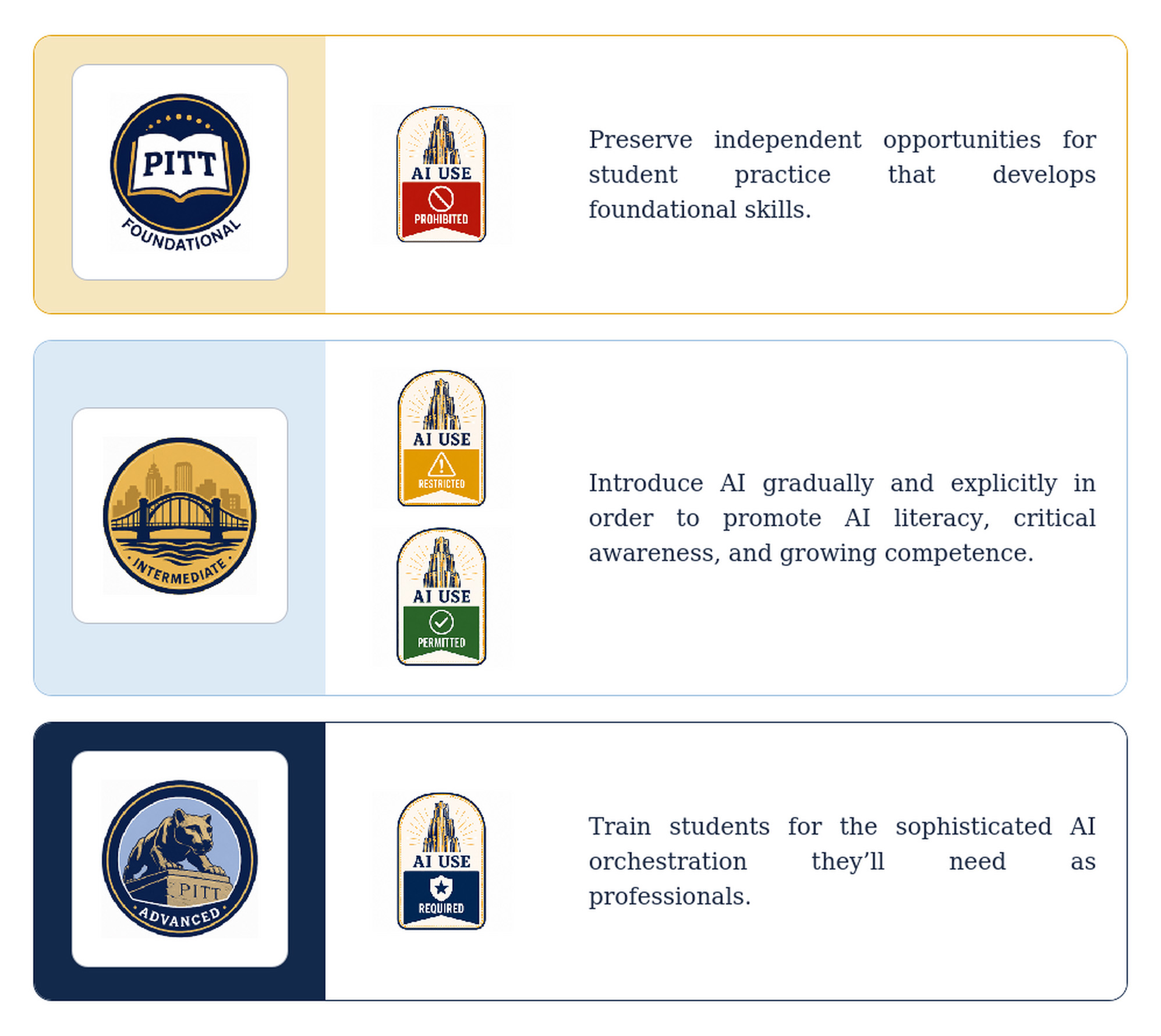
An icon can signal a course’s default stance on a syllabus or the specific uses that an instructor permits on an individual assignment within a course. For example,
-
Required: AI use might be required in a capstone course with an AI-mastery learning objective or on an assignment where a student produces and critiques an AI summary of a primary source.
-
Permitted: AI use might be permitted in an upper-level intermediate course or on an assignment like a problem set that the student could debug with AI or work through unaided, either path demonstrating the same understanding.
-
Restricted: AI use might be restricted in an intermediate-level course early in a student’s trajectory through a major course of study or on an assignment like an essay that AI could help the student outline and proofread but that requires the student’s original analysis and drafting.
-
Prohibited: AI use might be prohibited in a foundational-level course or on an assignment like an in-class diagnostic meant to gauge a student’s unaided command of material before instruction on the subject begins.
Think about the icon as a headline, not the article. It can tell the student what category a course or an assignment resides within, but it can’t explain why, or connect your stance to a specific learning objective, or spell out the particulars of how AI use is restricted or the limitations on when it’s permitted. And it can’t answer the question that the student is afraid to ask. The icon is an invitation to a conversation, never a replacement for it.
A shared vocabulary rather than a new rule, our system of AI-use icons will become more valuable the more widely it’s adopted. The icons don’t decide your position — you do. The icons just offer a uniform way to communicate, a common language of color and image that students can instantly understand, with your help and support. By adopting this system, you can model for students one of the main things we want them to learn about AI—using these tools isn’t a single yes-or-no question but a judgment that shifts from task to task and context to context, anchored by sound principles of discernment.
NOTE: Visit the Teaching Center’s website to download and save these icons for use in your course.
J.D. Wright is a teaching consultant with the University Center for Teaching and Learning. He can be reached at jd_wright@pitt.edu.
References and further reading:
Fu, Y., Lin, Y., Wang, J., Tran, S., & Hiniker, A. (2026). “Everyone’s using it, but no one is allowed to talk about it”: College students’ experiences navigating the higher education environment in a generative AI world. arXiv preprint (2026). Arxiv.org/html/2602.17720v1
Marshik, T., McCracken, C., Kopp, B., & O’Marrah, M. (2024). Student and instructor perceptions and uses of artificial intelligence in higher education. Teaching of Psychology, 52(3), 339-346. https://doi.org/10.1177/00986283241299745
Rix, K. (2026, April 1). Cal State students widely use AI tools, but mistrust results and fear job impact. EdSource. https://edsource.org/2026/csu-students-widely-use-ai-tools-but-mistrust-results-and-fear-job-impact/754924
Sweller, J. (1994). Cognitive load theory, learning difficulty, and instructional design. Learning & Instruction, 4(4), 295-312. https://10.1016/0959-4752(94)90003-5
Teale, C. (2026, April 8). Surveys highlight AI’s growth, uncertain future in higher education. Route Fifty. https://www.route-fifty.com/artificial-intelligence/2026/04/surveys-highlight-ais-growth-uncertain-future-higher-education/412704/
Tsao, J. (2025). Trajectories of AI policy in higher education: Interpretations, discourses, and enactments of students and teachers. Computers & Education: Artificial Intelligence 9, Article 100496. https://www.sciencedirect.com/science/article/pii/S2666920X25001365